
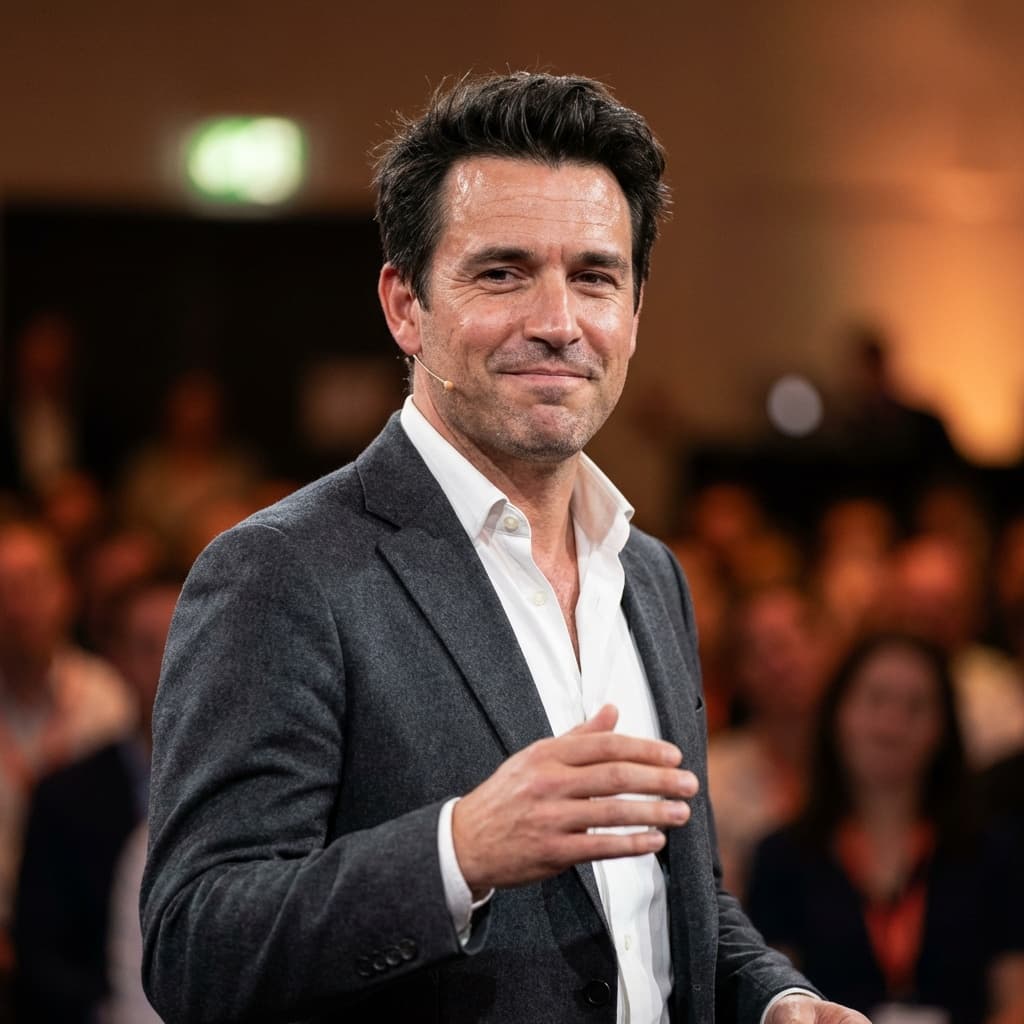
 Example of the Speaker style
Men · Professional · “Speaker” style
AI Keynote Speaker Photo for Men
Event organizers want to see you on stage, not just in a studio. This style puts you mid-gesture on a conference stage with a headset mic, a warm spotlight on your face and a blurred audience behind you — the classic speaker-reel shot.
Best for
- Speaker pages and one-sheets
- Conference and event programs
- Podcast and webinar promotion
- Thought-leadership LinkedIn posts
2 HD photos per style · $1.49 per photo on the web, no subscription · ready in minutes
What the Speaker style looks like
Your face comes from your selfies. Everything else — clothes, location and light — is created by HeyPhoto's AI to match this look.
Outfit
Slim charcoal blazer over a white open-collar shirt, with a thin headset microphone.
Setting
A conference stage with a blurred audience under spotlights.
Lighting
Cool stage lighting with a warm spotlight on the face.
Expression
Dynamic and engaged, mid-presentation.
How to get an AI keynote speaker photo from your selfies
- 01
Upload 3 selfies
One straight-on and two at a slight angle, taken in good light. Ordinary phone selfies are perfect — no studio or photographer needed.
- 02
Choose “Speaker”
In the style picker, tap Male › Professional › Speaker. Optionally fine-tune hairstyle, glasses or age, and add any other styles you like — each one gives you 2 photos.
- 03
Download your keynote speaker photo
Your HD photos are ready in a few minutes. Download them and use them anywhere — they're yours to keep, with no watermark.
Selfie tips for a workplace portrait
For the Speaker style
Stage shots look most believable with an animated expression. Include a selfie where you're talking or smiling mid-sentence.
- Daylight from a window is ideal; overhead office lights cast shadows under the eyes.
- Keep your glasses on if you wear them at work — or switch glasses on in customization.
- Use recent photos that match your current hairstyle and facial hair.
- Hold the phone at eye level; low angles distort proportions.
Keynote Speaker Photo FAQ
Do I need a real stage photo for my speaker page?
Organisers love on-stage photos because they show you in action. If you don't have a good one yet — or your last event photos were blurry — this style gives you a convincing keynote shot to use until you do.
How do I get the Speaker style?
Download HeyPhoto from the App Store or use it on the web. Upload 3 selfies, then choose Male › Professional › Speaker in the style picker. Each style gives you 2 HD photos (on the web it's $1.49 per photo, no subscription), and you can add as many other styles to the same order as you like.
Does the background look like a real location?
Yes. The setting is generated to look like a real place, softly blurred as if shot with a portrait lens, so it reads as an on-site photo shoot rather than a cut-out on a fake backdrop.
Will my keynote speaker photo still look like me?
That's the point of HeyPhoto. Your face shape, features and skin tone come from your selfies — only the outfit, background, lighting and pose change. If a result doesn't look like you, report it and you can get a free regeneration.
Can my whole team get matching photos in this style?
Yes. Each person uploads their own selfies and picks Speaker, which gives a consistent look — same kind of outfit, setting and light — across your team page.
What happens to my selfies?
They're sent over an encrypted connection and used only to generate your photos. Uploaded selfies are deleted from our processing servers after your order (usually within 24 hours, always within 30 days), and they're never used to train AI models. Details are in our Privacy Policy.
Similar styles for men
See all 96 styles →
Doctor Headshot
“Medical” style

CEO Executive Portrait
“Boss Chair” style

Thoughtful Pose Headshot
“Curious” style

Industrial Loft Headshot
“Factory” style

Lawyer Headshot
“Lawyer” style

Office Headshot
“Whiteboard” style

Also available for women
AI Keynote Speaker Photo for Women
Get your keynote speaker photo in minutes
Three selfies in, studio-quality headshots out. Use HeyPhoto on your iPhone or right here in your browser.